k3s, cgroups & chaos
After the cluster network was finally up and running, it was time for the next step: k3s again. How hard could it be, right? (You already know where this is going…)
Step 1: Preparing all Pis
Like before, all Pis need to be setup so that k3s has everything it needs (and wants). This includes:
Upgrade packages
sudo apt update && sudo apt upgrade -y
Disable swap
sudo swapoff /dev/zram0
sudo systemctl mask systemd-zram-setup@.service
Checking cgroups
On my old setup with the older OS, I had to tweak cgroups to keep k3s happy. Given I am now on Debian Trixie, I was curious if they already use cgroups v2 - so I checked:
stat -fc %T /sys/fs/cgroup
returning cgroup2fs - which is cgroup v2. Lucky me, nothing to change I thought - realizing in step 2 this is still not enough. More about this in a bit.
Step 2: Installing k3s on the Control Plane
Having the correct cgroups I was happy and started installing k3s with:
curl -sfL https://get.k3s.io | sh -
But …
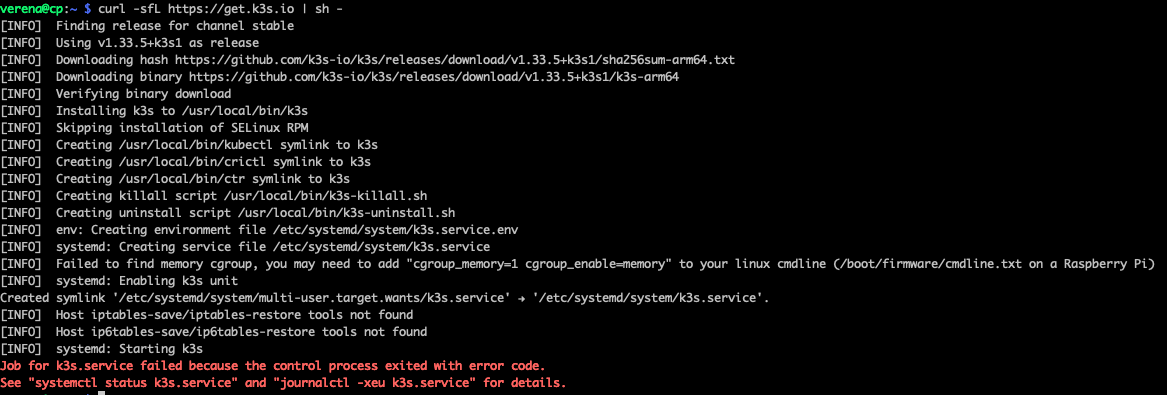
Soooo, the new OS is using the correct cgroup, but memory limit is not set, but expected. So, again some work needs to be done in the cmdline.txt file. Open it with:
sudo nano /boot/firmware/cmdline.txt
then add the following at the very end:
cgroup_enable=memory cgroup_memory=1
I rebooted the Pi and thought all should work out after restarting k3s, right? Well, not quite. It was failing and not starting up. Having a look into the logs via
sudo journalctl -u k3s -n 50 --no-pager
gave me this interesting lines:

So, it basically says kube-proxy cannot find any support for IPv4 (which definitely exists), and hence is failing. But: ipv4 was set. Turns out k3s still talks iptables, while my new OS runs nftables. Of course it does. So, time to figure out how to get it to work.
Attempt #1: Tell kube-proxy to use nftables
I first tried the “easy way” - and let k3s know it should use nftables. So I created an env file:
sudo nano /etc/systemd/system/k3s.service.env
and added:
K3S_KUBEPROXY_ARGS="--proxy-mode=nftables"
Then reloaded and restarted with
sudo systemctl daemon-reexec
sudo systemctl restart k3s
…and nothing changed. Same error. Great.
Attempt #2: Load kernel modules manually
After quite some research I found out one could try to use kernel modules.
So:
sudo modprobe overlay
sudo modprobe br_netfilter
sudo modprobe iptable_filter
sudo modprobe iptable_nat
Persist them by running:
echo -e "br_netfilter\noverlay\niptable_filter\niptable_nat" | sudo tee /etc/modules-load.d/k3s.conf
Add some sysctl settings
cat <<EOF | sudo tee /etc/sysctl.d/k8s.conf
net.bridge.bridge-nf-call-iptables = 1
net.ipv4.ip_forward = 1
EOF

sudo sysctl --system
Still no luck though.
Attempt #3: Go legacy mode
So, looks like I needed to not only enable the modules, but also bring back good old iptables.
sudo apt install iptables -y
sudo update-alternatives --set iptables /usr/sbin/iptables-legacy
sudo update-alternatives --set ip6tables /usr/sbin/ip6tables-legacy
And that last bit made the trick - k3s started and stayed up 🎉
Before celebrating too much, I grabbed the node token (for the workers) by running:
sudo cat /var/lib/rancher/k3s/server/node-token
and copied it into a local kubeconfig file.
Step 3: Adding the Worker Pis
After finally finding out how to have k3s running despite using nftables for my network setup, the rest went smoothly. On each worker, I had to:
Enable memory cgroups
sudo nano /boot/firmware/cmdline.txt

# Add:
cgroup_enable=memory cgroup_memory=1
Then reboot.
Load kernel modules & enable iptables
sudo modprobe overlay
sudo modprobe br_netfilter
sudo modprobe iptable_filter
sudo modprobe iptable_nat

# Make them persistent
echo -e "br_netfilter\noverlay\niptable_filter\niptable_nat" | sudo tee /etc/modules-load.d/k3s.conf

# Set sysctl parameters
cat <<EOF | sudo tee /etc/sysctl.d/k8s.conf
net.bridge.bridge-nf-call-iptables = 1
net.ipv4.ip_forward = 1
EOF

sudo sysctl --system

# Move to  iptables
sudo apt install iptables -y
sudo update-alternatives --set iptables /usr/sbin/iptables-legacy
sudo update-alternatives --set ip6tables /usr/sbin/ip6tables-legacy
Connect each worker
curl -sfL https://get.k3s.io | \
 K3S_URL=https://192.168.42.10:6443 \
 K3S_TOKEN=<my node token> \
 sh -
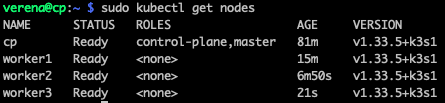
And… all nodes joined:
Final Touches
Let the control plane do control stuff only:
sudo kubectl taint nodes cp node-role.kubernetes.io/control-plane=:NoSchedule